Edit PDFs for life
A complete, free PDF toolkit that runs entirely in your browser. No login, no sign-up, no uploads. Edit, convert, sign and organize — your documents stay with you.

Every PDF tool you need
Pick a tool — it works instantly, right here in your browser.
PDF Learning Center
Ten connected guides, not isolated articles
Learn the complete workflow behind each tool: editing, conversion, privacy, errors, devices, comparisons and output quality.
Pick the right workflow for merging, signing, scanning, compressing and sharing.
How PDF Editors WorkUnderstand annotations, layers, OCR, signatures and flattening.
Conversions and File FormatsChoose between PDF, Word, JPG, PNG, HEIC and text.
PDF Editor ComparisonsCompare browser, desktop and cloud workflows fairly.
PDF Errors and FixesDiagnose files that will not open, print, copy or convert.
Privacy and SecurityCheck local processing, metadata, redaction and safe handling.
Mobile, Desktop and BrowsersChoose the right device for file size, speed and precision.
Free vs Paid PDF EditorsKnow when a focused free tool is enough and when paid software helps.
PDF Tools for Specific JobsWorkflows for students, offices, legal teams, creators and businesses.
Quality, Size and OutputControl resolution, compression, page size and selectable text.
What is LyfPDF?
LyfPDF is a free online PDF toolkit with 33 working tool pages — edit, sign, merge, split, compress, rotate, organize, delete pages, watermark, page numbers, JPG/PNG↔PDF conversion, PDF↔Word, OCR, image cleanup and print-ready workflows. Twelve core tools are localized across 7 interface languages, while the advanced tools are currently available in English. Every tool runs inside your web browser, so 0 documents are uploaded, no account is needed, and there are no daily task limits. LyfPDF does not add a brand watermark to converted or edited documents. Timetable and Calendar Maker designs include fixed lyfpdf.com branding in downloads and printouts.
What can you do with LyfPDF?
- Organize: merge PDF files, split page ranges, reorder or delete pages, rotate sideways scans.
- Convert: JPG/PNG to PDF, PDF to JPG, PDF to editable Word, Word to PDF, PDF to plain text.
- Edit & sign: type, draw, highlight, white-out and place a typed or drawn signature.
- Optimize: compress a PDF for email limits, add page numbers, stamp a watermark.
- Read scans: OCR turns scanned documents and photos into editable text in 14+ languages.
LyfPDF is also written Lyf PDF. Whatever you are looking for — merging, editing, converting or signing — the promise is the same: every PDF task, free, on your own device.
New to PDFs? Start with What is a PDF? — the beginner's guide, browse the best free PDF tools in 2026, or get quick answers in the FAQ.
How is LyfPDF different from other online PDF tools?
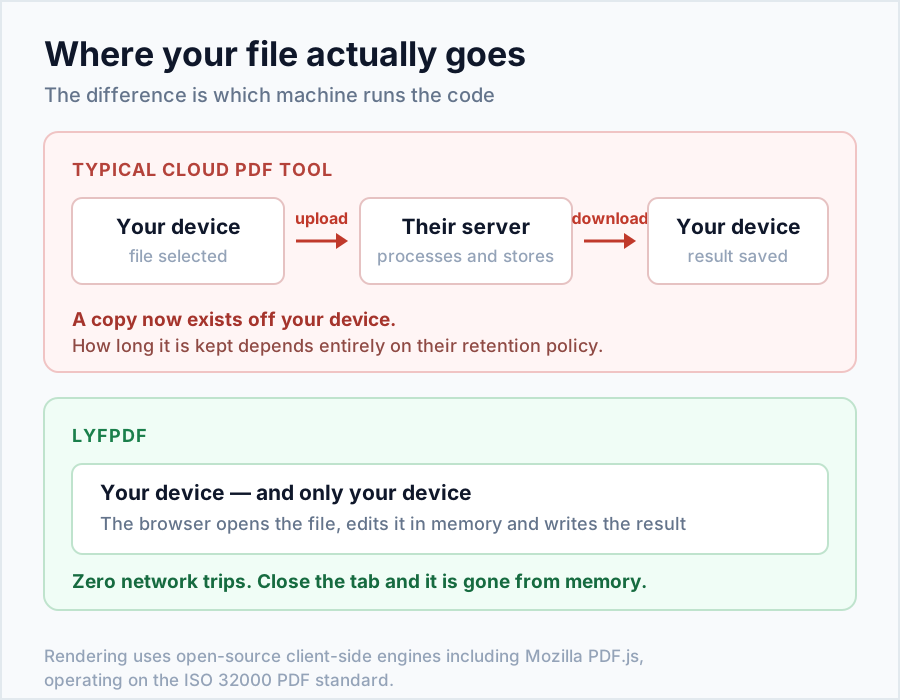
Most online PDF services upload your document to their servers, process it there, and send a result back — which means your file leaves your control. LyfPDF takes the opposite approach: the processing code is downloaded to your browser once, and your document is transformed on your own device. That removes the upload/download round-trip, removes account walls, and removes the privacy risk in one move.
| Feature | LyfPDF | Typical cloud PDF sites |
|---|---|---|
| File uploaded to a server | Never — 100% in-browser | Yes, on every task |
| Account / login required | No | Often, after 1–2 uses |
| Price | Free, all 33 tools | Free tier + paid limits |
| Daily task limits | None | Usually 1–3 per day free |
| Works after page loads offline | Yes (processing is local) | No — needs their server |
Is LyfPDF really private?
Yes — by architecture, not just by promise. LyfPDF renders and edits documents using open-source, client-side engines such as Mozilla's PDF.js, the same technology Firefox uses to display PDFs, operating on files in the open ISO 32000 PDF standard. Because the work happens on your device, there is no server that could store, leak or scan your document — when the tab closes, the file is gone.
Frequently asked questions
Is LyfPDF really free?
Yes. All 33 tools are free with no daily task caps. LyfPDF does not add a brand watermark to converted or edited documents. Timetable and Calendar Maker designs include fixed lyfpdf.com branding in downloads and printouts. Large files are limited by device memory.
Are my files uploaded to a server?
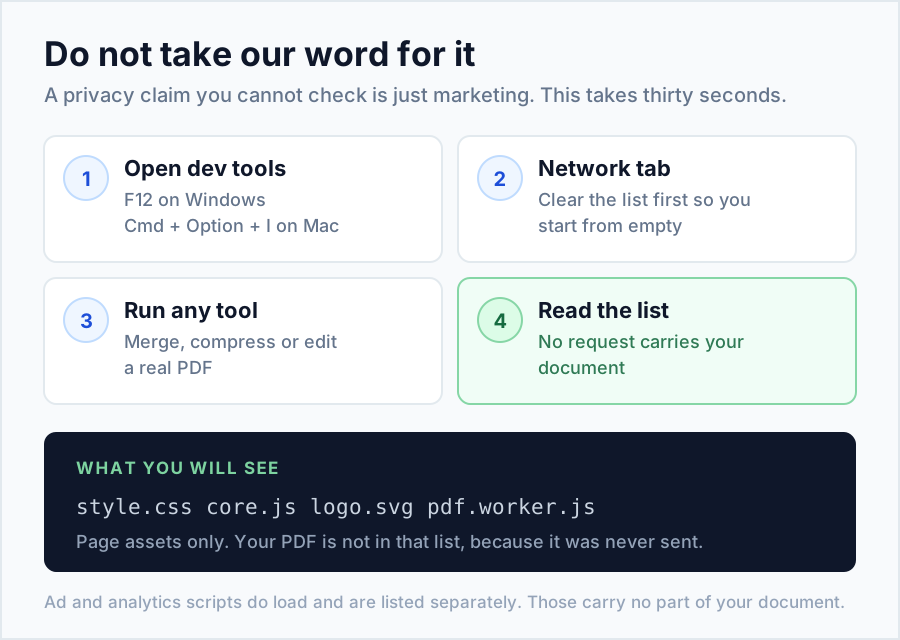
No. LyfPDF processes files with JavaScript directly on your device, so 0 files are ever uploaded, stored or shared. When you close the tab, the document is gone from memory. You can check this yourself: open your browser’s developer tools, watch the Network tab while a tool runs, and you will see no document being sent. That is why LyfPDF suits ID cards, mark sheets and contracts.
Do I need to create an account?
No account, login or email is ever required. Open any tool, pick your file and download the result — that is the whole flow. Because nothing is tied to a login, LyfPDF keeps no history of your documents. Bookmark the tools you use most, and keep your own copy of every file you download, because there is no cloud folder to recover it from.
Is there a file size limit?
There is no artificial limit. Because processing happens on your own device, the practical limit is your device's memory — most phones and laptops comfortably handle PDFs of 100 MB or more. Very large scans can slow an older phone. If a tool feels slow, close other tabs, split the PDF into smaller parts first, or use a laptop for that one job.
Which languages does LyfPDF support?
The interface is available in 7 languages: English, Hindi, Spanish, Portuguese, French, Arabic and German. The OCR tool can additionally extract text in 14+ languages including Hindi, Arabic, Chinese, Japanese, Bengali, Tamil and Urdu. Each language has its own pages, such as /hi/ for Hindi and /ar/ for Arabic, and the Arabic version uses a right-to-left layout. Your files are processed the same way in every language.
Does LyfPDF work on mobile?
Yes. Every tool, including the full editor with signatures, is touch-friendly and works on Android and iPhone browsers as well as on desktop — no app install needed. On a phone, pick files from your gallery or Files app, and the result is saved to your Downloads folder. Large batches simply take a little longer than on a laptop.
Is there a free PDF converter with no sign up?
Yes. If you need a free pdf converter online or a to pdf online converter, LyfPDF converts PDF to Word, PDF to JPG, JPG to PDF and Word to PDF free, with no sign-up and no upload. Files are converted in your browser.
Invoice templates for business and freelance work
Create invoices with your logo, itemized charges and payment terms. Browse 19 invoice template options, including service, consulting, retail and receipt styles, or read how to create an invoice online.