About LyfPDF
Free, private PDF tools that run entirely in your browser — here's the story and the engineering behind that promise.

What is LyfPDF, and why does it exist?
LyfPDF is a free online PDF toolkit — 33 working tool pages, with 12 core tools localized across 7 interface languages — built on one refusal: you shouldn't have to upload your private documents to a stranger's server just to edit a PDF. Every tool here, from the full editor to merge, split, compress, convert, sign and OCR, runs inside your own browser, so 0 documents are uploaded, no account exists to create, and there is nothing for us to store.
Alongside the PDF tools, LyfPDF includes document makers — the Invoice Generator, Timetable to PDF, the Printable Calendar Maker and the Worksheet Generator. The Worksheet Generator is one suite with eight modes: name, alphabet, number, shape, word, sentence, handwriting and pre-writing pattern tracing worksheets, created and exported in the browser. The eight modes count as one tool, which is why the total is 33.
How does "everything in your browser" actually work?
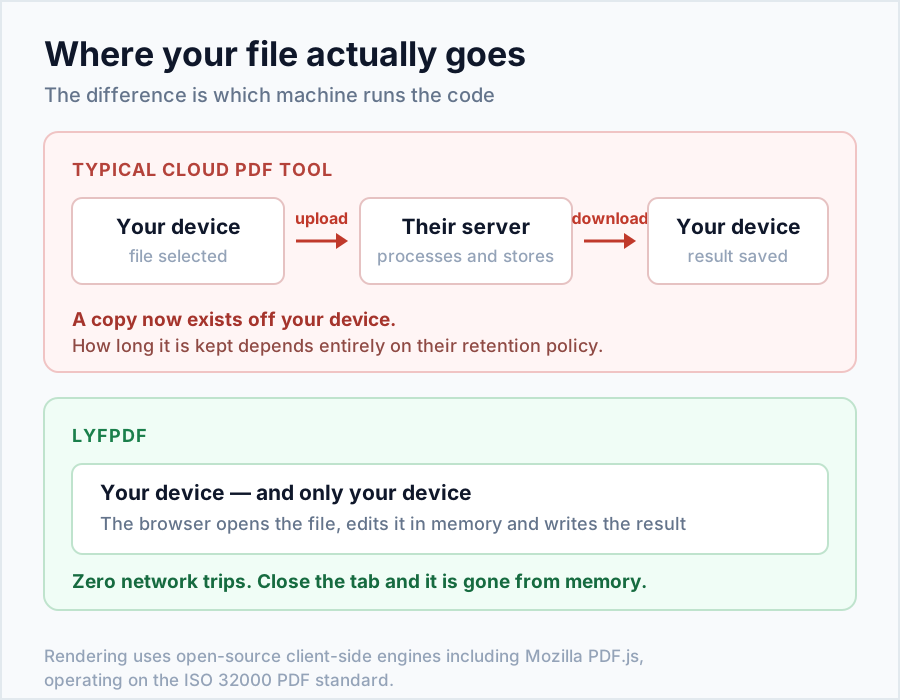
Modern browsers are powerful enough to do real document work. When you open a LyfPDF tool, a small amount of open-source code is downloaded to your device — Mozilla's PDF.js for rendering (the same engine Firefox uses), pdf-lib for building files, and Tesseract for OCR. Your document is then read, transformed and saved by your own device. The file travels from your storage to your browser's memory and back to your Downloads folder — never across the internet.
What that architecture means for you
- Privacy by design, not by promise. A server that never receives your file cannot store, scan, sell or leak it.
- Speed. No upload/download round-trip — a merge that takes a minute on cloud sites takes seconds here.
- No walls. No account, no email capture, no "2 free tasks per day". LyfPDF does not add a brand watermark to converted or edited documents. Timetable and Calendar Maker designs include fixed lyfpdf.com branding in downloads and printouts.
- Resilience. Once a tool page has loaded, the processing itself works even if your connection drops.
Who is LyfPDF for?
Students converting homework photos to PDF, job-seekers compressing resumes under portal limits, freelancers signing agreements, offices splitting and merging reports, and anyone handling documents they'd rather not hand to a third party — bank statements, medical records, ID proofs. The interface speaks English, Hindi, Spanish, Portuguese, French, Arabic and German, and the OCR reads 14+ languages.
What we believe
- Privacy is the default, not a paid upgrade.
- Free should mean free — supported by unobtrusive ads, never by your data or your documents.
- Tools should be honest. Where a technique has a trade-off (compression rasterises text; complex Word layouts simplify), we say so on the tool page instead of hiding it.
- Simple beats bloated. Each tool does one job well, with a written guide anyway.
One name, many spellings
The name is LyfPDF — "lyf" as in life, because documents follow you for life and the tools should be free for life. You may also see it written as Lyf PDF; every spelling lands in the same place: lyfpdf.com.
Who operates LyfPDF
LyfPDF is an independent project. It is not owned by Adobe, Google, Mozilla or any other PDF vendor. There is no login, no customer account, and no place where a document is stored, because the tools run in the visitor’s browser. The public contact is hello@lyfpdf.com. Do not attach confidential files to that address. A message can describe a bug. It cannot ask the operator to open a document the server never received.

LyfPDF is built and run by Mantu Kumar from Mumbai, India. He works on the tools, the guides and the fixes on this site, and reads the messages sent to the contact address. The site does not claim a team headcount or a professional licence it does not have.
What the tools actually do
Three different things happen, and the pages should not blur them. Merge, split, rotate and organize copy PDF pages, so text that was selectable stays selectable. Compress redraws every page as a JPEG (Light ≈ 2500 px / quality 0.82, Balanced ≈ 1800 px / 0.60, Strong ≈ 1400 px / 0.38) and the copy is no longer selectable text. Watermarks and page numbers are drawn in Helvetica, so a Hindi or Arabic stamp will not render; use a Latin word or a logo image. A signature drawn in the editor is an image of a signature, not a certificate. OCR reads a picture of text and must be proofread.
The site is free to use. Hosting has a cost. Advertising is only appropriate after a programme accepts the site, and it is not a reason to publish extra pages. A tool page should still be worth opening with every ad removed.
The numbers
- 33 free tool pages — see them all on the homepage.
- 12 core tools localized across all 7 interface languages.
- 7 interface languages, plus 14+ OCR languages.
- 0 files uploaded, ever — processing is 100% on-device.
- 0 accounts, passwords or emails required.
Have an idea, found a bug, or want a tool we don't have yet? Get in touch — we read every message.