The best free PDF tools in 2026
Task by task: the fastest free way to edit, sign, merge, compress and convert PDFs this year — with zero uploads and zero logins.

How should you pick a PDF tool in 2026?
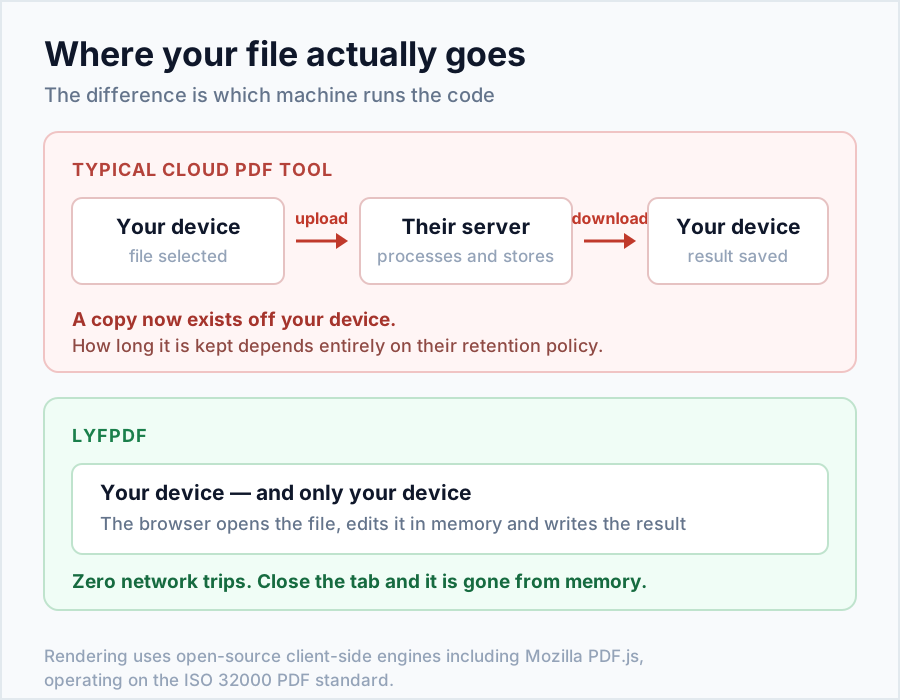
Three questions decide everything: Does it upload your file? (privacy), Does it wall you behind logins and daily limits? (friction), and Does it do the specific job well? In 2026 the best answer for everyday tasks is a browser-based toolkit that processes files on your device — no upload, no account, no watermark. That's the standard this guide uses.
Best free tool for every PDF task
| Task | Best free pick | Why it wins |
|---|---|---|
| Edit & fill a PDF | LyfPDF Editor | Type, draw, highlight, white-out — flattened permanently, on-device |
| Sign a PDF | LyfPDF Sign | Typed or drawn signature, placed anywhere, never uploaded |
| Merge PDFs | Merge PDF | Unlimited files, drag ordering, original quality |
| Split / extract pages | Split PDF | Any range, or every page to its own file (ZIP) |
| Delete pages | Delete Pages | Visual thumbnails — never remove the wrong page |
| Compress for email/portals | Compress PDF | Three honest presets, exact size read-out (e.g. 18 MB → 2 MB) |
| Images → PDF | JPG to PDF / PNG to PDF | Fit-to-image or A4; ID photos stay on your device |
| PDF → editable Word | PDF to Word | Real .docx with line breaks, bold, RTL support |
| Word → PDF | Word to PDF | Converts locally — offer letters never touch a server |
| Read a scanned document | OCR | 14+ languages incl. Hindi & Arabic, fully on-device |
| Remove a faint watermark | Remove Watermark | Auto, manual and area-cover modes with preview |
| Permanently redact information | Redact PDF | Burns selected areas into a new page image |
| Compare two versions | Compare PDF | Wipe slider, difference map and visual report |
| Edit document metadata | Metadata Editor | Changes properties without rasterizing pages |
| Phone images → clean PDF | Scan to PDF | Camera-ready cleanup, reordering and A4 output |
Browser tools vs desktop software vs cloud sites — 2026 verdict
- On-device browser toolkits (like LyfPDF): best for everyday tasks — instant, free, private, nothing to install. The whole toolkit is free because your device does the computing.
- Desktop suites (Adobe Acrobat & co.): still right for niche professional needs — cryptographic digital signatures, PDF/A archival, redaction workflows, prepress. Expect a subscription.
- Cloud upload sites: compare their file-retention rules, account requirements, current free limits and output quality. Upload-based collaboration can be useful, but sensitive documents need an appropriate sharing and deletion policy.
What does "free" really mean here?
On LyfPDF, all 30 tools are free, with no account or daily task caps. LyfPDF does not add a brand watermark to converted or edited documents. Timetable designs include fixed lyfpdf.com branding in downloads and printouts. The honest limits that do exist are technical, and each tool page states them plainly (compression rasterises text; complex Word layouts simplify; scans need OCR before text extraction).
Quick checklist before you trust any PDF site
- 🔍 Does the privacy policy say files are processed in your browser? (Ours does — verifiably.)
- 🔍 Can you use it without an email or account?
- 🔍 Are limits and trade-offs stated up front, or discovered after your third task?
- 🔍 Does the output carry a watermark you didn't ask for?
New advanced tools for document cleanup and review
The strongest additions are not generic converters: they solve review and privacy problems that ordinary merge/compress sites often skip. Watermark cleanup includes a preview and three modes; redaction permanently burns selected areas; comparison highlights visual changes; metadata editing avoids page conversion; and scan-to-PDF improves phone images before export.
Remove faint watermarks with controlled, previewed processing.
PrivacyPermanently remove sensitive page regions.
ReviewCompare revisions with wipe and difference views.
Frequently asked questions
What is the best free PDF editor in 2026?
For everyday editing, filling and signing, an on-device browser editor like the LyfPDF editor — free, no login, and your document never leaves your machine.
Is there a truly free PDF tool without watermarks?
LyfPDF does not add a brand watermark to converted or edited documents. Timetable designs include fixed lyfpdf.com branding in downloads and printouts. All 30 tools are free; practical file limits depend on your device.
Do I still need Adobe Acrobat?
Only for specialist needs: certified digital signatures, redaction, PDF/A archiving or print production. Routine tasks no longer require it.
Are online PDF tools safe for confidential files?
Upload-based ones require trust in a stranger's server. On-device tools are categorically safer — the file never leaves your machine, so there is nothing to leak.
What's the best way to compress a PDF below 2 MB?
Use Compress PDF on the Strong preset — scans typically shrink 70–90%, and the exact result is shown immediately.
Keep reading: PDF for beginners · step-by-step tool guide · full FAQ
HEIC to PDF for iPhone photos
The HEIC to PDF Converter is useful when an application form, office workflow or older device does not accept Apple’s HEIC format. It supports multiple photos, drag-to-reorder, A4 or US Letter pages, automatic orientation, margins and quality controls. For scanned paperwork, use the separate Scan to PDF tool for crop, deskew and contrast correction.